How to Type Korean on Any Device: Complete Keyboard Guide
Being able to type in Korean is an essential skill for any learner. Whether you want to text Korean friends, search for Korean websites, or practice writing, you need to set up Hangul input on your devices. The good news is that every major operating system has built-in Korean keyboard support — no extra software required. This guide focuses on setup and the standard keyboard layout; once you are typing, see how to practice Korean typing to build real speed and recall.
Setting Up Korean Input by Platform
Windows 10 / 11
- Open Settings > Time & Language > Language & region.
- Click "Add a language" and search for 한국어 (Korean).
- Install the language pack (uncheck optional features if you only need typing).
- Once installed, press Win + Space to switch between English and Korean input.
- Alternatively, press the right Alt key to toggle Korean/English mode within the Korean keyboard.
macOS
- Open System Settings > Keyboard > Input Sources (or Text Input > Edit).
- Click the + button and search for Korean.
- Select "2-Set Korean" (2벌식) — this is the standard layout used in South Korea.
- Enable "Show Input menu in menu bar" so you can see which keyboard is active.
- Press Control + Space (or Fn + Globe on newer Macs) to switch between input sources.
iPhone / iPad
- Open Settings > General > Keyboard > Keyboards.
- Tap "Add New Keyboard" and select Korean.
- Choose "Standard" for the 2벌식 QWERTY-style layout (recommended for learners).
- When typing, tap the globe icon on the keyboard to switch to Korean.
- Tip: The "10-Key" option uses a phone-style layout — convenient for native speakers but harder for learners.
Android
- Open Settings > System > Languages & input > On-screen keyboard.
- Select your keyboard app (usually Gboard or Samsung Keyboard).
- Tap Languages > Add keyboard and search for Korean.
- Select the 2벌식 (2-Set) layout.
- When typing, press the globe or language switch key to toggle to Korean.
On all platforms, "2벌식" (2-beolsik) is the standard Korean keyboard layout used by virtually everyone in South Korea. Always choose this option unless you have a specific reason not to.
Understanding the 2벌식 Keyboard Layout
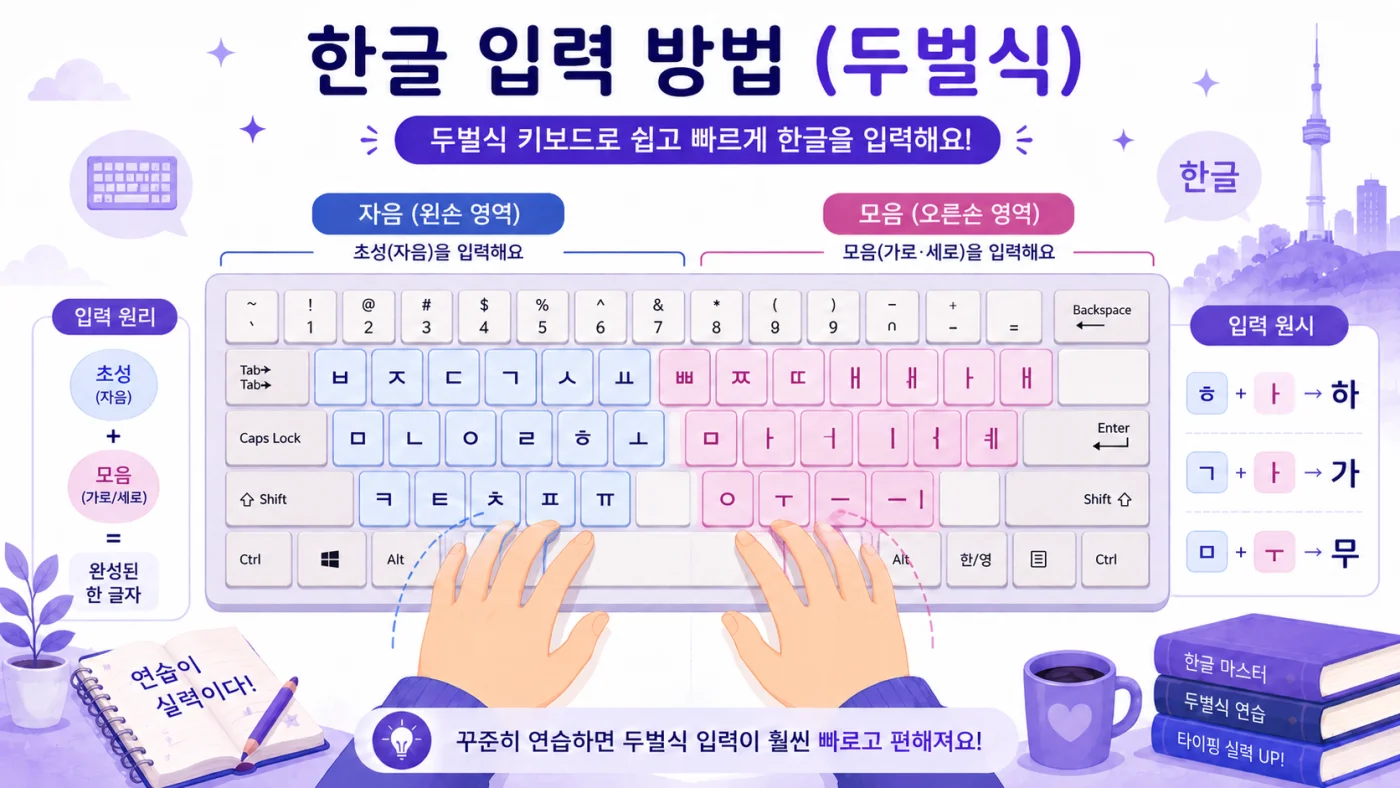
The Korean 2벌식 keyboard maps Hangul letters onto a standard QWERTY keyboard. The layout is logical: consonants are on the left side and vowels are on the right side. This split matches how Korean syllable blocks work — you typically type a consonant first, then a vowel.
Consonant Positions (Left Side)
| Key | Consonant | Romanization |
|---|---|---|
| Q | ㅂ | b |
| W | ㅈ | j |
| E | ㄷ | d |
| R | ㄱ | g |
| T | ㅅ | s |
| A | ㅁ | m |
| S | ㄴ | n |
| D | ㅇ | ng / silent |
| F | ㄹ | r/l |
| G | ㅎ | h |
| Z | ㅋ | k |
| X | ㅌ | t |
| C | ㅊ | ch |
| V | ㅍ | p |
Vowel Positions (Right Side)
| Key | Vowel | Romanization |
|---|---|---|
| Y | ㅛ | yo |
| U | ㅕ | yeo |
| I | ㅑ | ya |
| O | ㅐ | ae |
| P | ㅔ | e |
| H | ㅗ | o |
| J | ㅓ | eo |
| K | ㅏ | a |
| L | ㅣ | i |
| ; | ㅡ | eu |
| B | ㅜ | u |
| N | ㅠ | yu |
| M | ㅡ | eu |
Typing Double Consonants (쌍자음)
Korean has five double (tense) consonants: ㄲ, ㄸ, ㅃ, ㅆ, ㅉ. To type these, hold Shift and press the corresponding consonant key. The computer automatically creates the double version.
| Keys | Double Consonant | Example Word |
|---|---|---|
| Shift + R | ㄲ | 까치 (kkachi, magpie) |
| Shift + E | ㄸ | 떡 (tteok, rice cake) |
| Shift + Q | ㅃ | 빵 (ppang, bread) |
| Shift + T | ㅆ | 쓰다 (sseuda, to write) |
| Shift + W | ㅉ | 짜다 (jjada, salty) |
Typing Compound Vowels
Compound vowels are formed by typing two vowel keys in sequence. The system automatically combines them into a single compound vowel. This works because Korean input methods understand syllable block construction.
| Keys | Compound Vowel | Romanization |
|---|---|---|
| H + K | ㅘ | wa |
| H + O | ㅙ | wae |
| H + L | ㅚ | oe |
| B + J | ㅝ | wo |
| B + P | ㅞ | we |
| B + L | ㅟ | wi |
| ; + L | ㅢ | ui |
How Korean Typing Works: Automatic Syllable Assembly
Unlike English where each key press produces a separate letter, Korean input automatically assembles characters into syllable blocks as you type. The system handles this in real time. Here is what happens when you type the word 한국 (hanguk, Korea):
- Press G → ㅎ appears
- Press K → ㅎ + ㅏ combine into 하
- Press S → 하 + ㄴ combine into 한 (ㄴ becomes the final consonant)
- Press R → The ㄱ starts a new syllable block: 한ㄱ
- Press B → ㄱ + ㅜ combine: 한구
- Press R → 구 + ㄱ combine into 국: 한국
The system is smart about syllable boundaries. If you type a consonant followed by a vowel, it knows the consonant starts a new syllable. If you type a consonant followed by another consonant, it treats the first as a final consonant (받침, batchim) of the current syllable.
Typing Tips for Faster Input
- Practice with home row first: The most common letters (ㅁ, ㄴ, ㅇ, ㄹ, ㅎ on the left; ㅗ, ㅓ, ㅏ, ㅣ on the right) are on the home row.
- Think in syllables, not letters: Type each syllable block as a unit — initial consonant, vowel, optional final consonant.
- Use typing practice sites: Try websites like 한컴 타자연습 (Hancom Typing Practice) for free Korean typing drills.
- Do not look at the keyboard: Place stickers on your keys at first, but aim to touch-type within a few weeks.
- Practice common words first: Start with 감사합니다, 안녕하세요, 네, 아니요 — words you already know.
- Use Korean to search: Switch to Korean input when searching for Korean content online. Real-world practice is the fastest way to improve.
Quick Reference: Essential Key Mappings
Troubleshooting Common Issues
- Characters appearing as separate letters (ㅎ ㅏ ㄴ instead of 한): Make sure you are using a Korean input method, not just a Korean font. The input method handles syllable assembly.
- Wrong syllable breaks: If a character splits into the wrong syllable, press the right arrow key to confirm the current syllable and start a new one.
- Cannot find the Korean keyboard on mobile: Some keyboard apps require downloading the Korean language pack separately from the keyboard settings.
- Typing ㅔ and ㅐ produces the same sound: This is normal — in modern Korean pronunciation, these two vowels have merged for most speakers. But they are spelled differently, so learn which words use which.
Korean typing feels awkward at first, just like learning any new keyboard layout. But because the layout is logically organized (consonants left, vowels right), most learners reach comfortable typing speed within two to four weeks of regular practice. Start by typing words you already know how to say, and gradually build speed as the positions become muscle memory.
Type-Along Words
The best first words to type are the ones you already say. Tap each below to hear it, then type it on your Korean keyboard. Saying, hearing, and typing together build the muscle memory faster than any single method alone. Once the keyboard feels natural, put it to work in our free Korean typing practice game — it drills these same words at increasing speed.
Quick Check: Typing Korean
1. How is the standard Korean (Dubeolsik) keyboard organized?
2. What is the recommended way to start building typing speed?
3. How do you set up Korean typing on most devices?
Use HangeulMate alongside your keyboard practice. As you learn new vocabulary and phrases in lessons, type them out on your Korean keyboard to reinforce both reading and typing at the same time.
Keep practicing with native-speaker audio
Every word is recorded by a native Korean speaker — tap to listen, free and without signing up.
Start Learning Korean Today
Master Hangul in 7 days with interactive lessons, AI conversation practice, and spaced repetition. 100% free to start.
Get Started FreeRelated Articles
What Is Hangul? The Complete Guide to the Korean Alphabet
Discover Hangul, the Korean alphabet created by King Sejong in 1443. Learn why it's considered one of the most scientific writing systems ever invented.
How to Read Korean in 30 Minutes: A Beginner's Quick Start
Learn to read Korean in just 30 minutes with this step-by-step guide. Master basic consonants, vowels, and syllable blocks with pronunciation tips.
Korean Typing Practice: Why It Matters and How to Get Started
Discover why typing practice accelerates Korean learning. Build muscle memory for Hangul with fun typing games, from single jamo to full sentences.